
WAYVIQ
THE WAYVIQ PLATFORM

One platform.
The whole
charging journey.

Connect infrastructure, properties, drivers and brand experiences in one commercial workspace. Explore the network, understand the stop and bring the businesses around it into view.
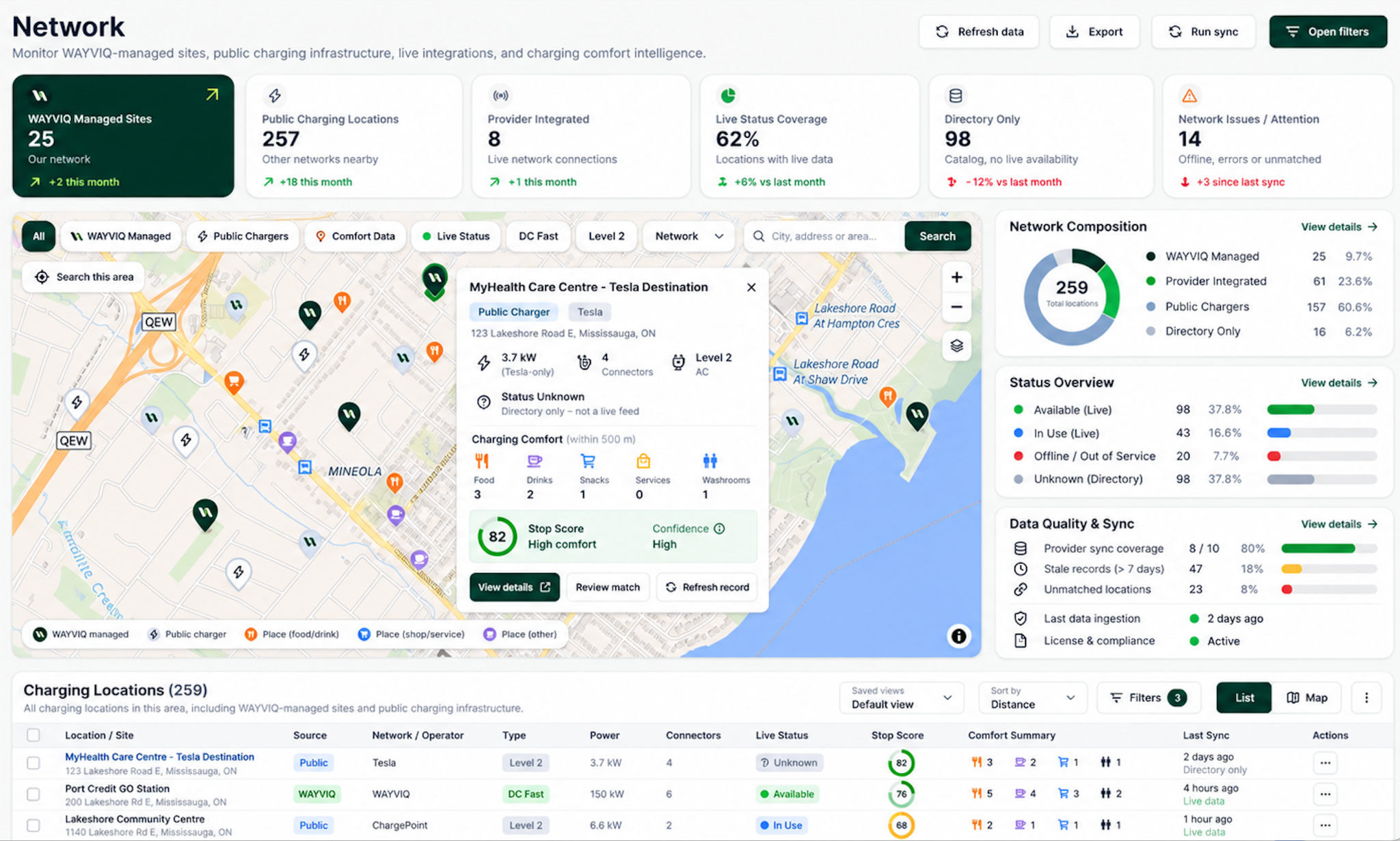
WAYVIQ unified network platform showing map and charging-location context
Platform interface illustrations · Workspace access is available after onboarding.
OperationsIntelligenceBrand campaignsPartner visibility
MORE THAN A DASHBOARD

Bring the pieces together.

The platform connects the operational record with the customer experience: where charging happens, what drivers can do there, and how partners participate.

01

Run the workspace.

Explore networks, properties, chargers, connectors and recorded sessions.

02

Improve the evidence.

Review data quality, coverage, vehicle profiles and charging-route decisions.

03

Connect the experience.

Link businesses, brands, campaigns and offers to relevant stops.

04

Share the right view.

Bring scoped partner visibility, activity reports and clear access boundaries together.

01 / NETWORK OPERATIONS

From the network
to the individual session.

Follow the relationships between charging locations, properties, hardware and activity. Keep the source and freshness of the evidence in view.

NETWORK OPERATIONS

Charging sessions

A connected view across the portfolio

PORTFOLIO ACTIVITY
12Sessions shown
8Locations
456.0 kWhEnergy shown
10 / 2Completed / charging
All locationsCCS1 · NACS · J1772Completed & charging
StartLocationConnectorPowerEnergyDurationStatus
10:42Toronto HarbourCCS1150 kW34.8 kWh32 minCompleted
10:28Kingston CentreNACS250 kW52.1 kWh41 minCompleted
10:16Ottawa RiversideCCS1180 kW18.6 kWhIn progressCharging
10:05London WestCCS1150 kW41.3 kWh38 minCompleted
09:52Barrie LakesideNACS250 kW27.9 kWh25 minCompleted
09:41Kitchener HubCCS1350 kW65.2 kWh47 minCompleted
09:30Windsor GatewayJ177211 kW22.5 kWhIn progressCharging
09:18Hamilton CommonsCCS1180 kW38.7 kWh36 minCompleted
09:06Toronto HarbourNACS250 kW46.1 kWh39 minCompleted
08:54Ottawa RiversideCCS1150 kW31.4 kWh33 minCompleted
08:41Kingston CentreJ177211 kW19.8 kWh108 minCompleted
08:25London WestNACS250 kW57.6 kWh45 minCompleted
12 varied sessions across 8 locations
Platform interface illustration. Explore your own portfolio after onboarding.

Network & properties

  • Explore the mapReview managed and discovered location context.
  • Organize the portfolioSearch property records and open individual site workspaces.

Chargers & connectors

  • Inspect the hardware recordReview power, connector, status and heartbeat information.
  • Follow the relationshipsMove between property, station, charger and session details.

Sessions & evidence

  • Review activityInspect stored timestamps, energy, meter records and amounts.
  • Keep unknowns visibleMissing or stale information remains explicit.
Explore the property workspace →
02 / DATA QUALITY & COVERAGE

Better decisions
start with better evidence.

Make missing information actionable. Data-quality queues and coverage campaigns help operators focus enrichment work on the records that need attention.

  • Inspect the gapsReview charging metadata, Comfort completeness, source context, stale records and scoring blockers.
  • Target the workUse scoped coverage campaigns and bounded enrichment controls, with request estimates and recorded outcomes.
  • Understand the resultInspect fresh records, no-result searches, failures and newly score-eligible locations.
03 / MARKETING & COMMERCE

The place behind
the promotion.

Bring brand creative, offers and business relationships into the charging journey. Campaign tools connect the message with the relevant property, stop and participating business.

01

Brand partners

Maintain supported brand records and imagery, then associate them with offers and campaigns.

02

Offers & benefits

Define headlines, descriptions, offer types, discount values, benefits, promo codes, validity dates and terms.

03

Campaigns & placement

Create campaign content and assign supported placements to properties, stops and businesses.

04

Creative & templates

Select stored media and use campaign templates to prepare the presentation.

05

Lifecycle & scheduling

Manage draft, publish, pause, end and archive states. Due publication currently uses an explicit operator command.

06

Recorded engagement

Inspect instrumented campaign events and supported conversion submissions, with clear attribution boundaries.

04 / TRIP & VEHICLE INTELLIGENCE

A charging plan.
With the reasoning behind it.

Support the complete decision: can this EV make the journey, where should it charge, how long could the stop take, what evidence supports the choice, and what happens if conditions change?

TRIP INTELLIGENCE / WORKSPACE PREVIEW

Plan the route. Inspect every decision.

YOUR JOURNEY

Toronto → Montréal

Route evaluated
Charging shortlist
A

Kingston Travel CentreRecommended stop · Compatible charging

Plan A
B

Brockville CentreAlternative stop · Route context reviewed

Backup
C

Cornwall HubAdditional option · Evidence available

Backup
Available in your workspace after onboardingDiscuss onboarding →
01 / VEHICLE & ENERGY

Can this vehicle make the trip?

Match the selected EV to an energy profile. Review usable battery, consumption, connector and DC charging capability, starting charge and destination reserve. Missing fields are surfaced before planning.

02 / ROUTE STRATEGY

Which route suits the journey?

Compare Optimized, Quickest, Fewest Stops and Best Stops. Review distance, driving time, charging stops and route coverage in the context of the selected vehicle.

03 / CHARGING PLAN

Where and how much should it charge?

Inspect arrival and required departure charge, energy to add, usable charging power, estimated duration and detour. Hardware and vehicle limits shape the charging estimate.

04 / STOP SELECTION

Why this stop rather than another?

Review ranked candidates, connector compatibility, Stop Score, Charge Confidence and Arrival Confidence where supported. Open recommendation reasoning, rejected candidates and the underlying decision trace.

05 / TIME AT THE STOP

What can fit into the charging window?

Use dwell context to see available food, drinks, snacks, washrooms and services. Amenity evidence and charging-time estimates inform the opportunity; they do not guarantee walking time or service.

06 / BACKUP & PLAN HEALTH

What if the plan needs to change?

Inspect Plan A, B and C and reevaluate supported plan-health states. Controlled scenarios cover in-use, degraded, stale or unavailable chargers, winter conditions and lower-than-expected charge.

Decision support, with explicit evidence.

The workspace also identifies incomplete vehicle profiles, insufficient charging coverage and route-provider failures. A confidence score is not a guaranteed free connector, and a simulation is not a live provider forecast.

Explore WAYVIQ Intelligence →
05 / CUSTOMERS, ACTIVITY & BUSINESS VISIBILITY

A clearer view
of what’s recorded.

Connect driver and vehicle records with stored charging activity, rewards, amounts and reporting. Keep commercial interpretation grounded in the available data.

BUSINESS VISIBILITY

Revenue overview

Last 30 days
Session amounts$18,640
Properties8
Recorded sessions426
Week 1Week 2Week 3Week 4
Toronto HarbourProperty activity
Kingston CentreProperty activity
Ottawa RiversideProperty activity
Workspace interface illustration. Property-level access is available after onboarding.
  • Drivers & vehiclesReview stored account and garage records, linked activity, supported filters and exports.
  • Rewards recordsInspect recorded credit activity, issued and redeemed points, and stored reward campaigns. The operator screen does not currently create reward campaigns.
  • Analytics & revenueReview supported activity summaries, property breakdowns and recorded amounts without inferring actual store sales or payment settlement.
  • Reporting & exportsDownload supported, scoped CSV files. Report availability and limits are explicit; unsupported PDF or settlement reports are not presented as complete.
06 / PARTNER ACCESS & PLATFORM CONTROLS

The right information.
The right workspace.

Separate global operator administration from a partner’s scoped property and charging view.

  • Partner visibilityOrganization-scoped overview, properties, chargers, sessions, businesses, revenue, reports and account information.
  • Administrative controlsUsers, organizations, supported account settings and operator workflows sit behind role-specific access.
  • Integration & system statesReview configuration, measured local health checks and explicit Places-operation outcomes.
  • Audit & API boundariesInspect supported audit activity and driver-facing API contracts. Identity permissions and live-provider authority are separate integration requirements.
PARTNER WORKSPACE

Your portfolio

Organization view
OverviewPropertiesSessionsReports
Properties8
Chargers42
Sessions426
Toronto HarbourProperty workspace →
Kingston CentreProperty workspace →
Ottawa RiversideProperty workspace →
London WestProperty workspace →
Organization-scoped information. Role-based workspace access.
Partner interface illustration. Access is provisioned as part of onboarding.
THE COMPLETE CAPABILITY INDEX

Find the feature.
See the detail.

Browse the platform by domain or search for a specific capability, including its current limits.

Overview & workspace
Operator overview
Review available charging activity, energy, property context and recorded events from a common starting point.
Navigation & search
Move between operational, customer, experience, marketing, business and administration workspaces; use the supported search and filtering controls.
Date ranges & comparisons
Apply supported periods and comparison windows to stored activity. Available metrics depend on the module and source data.
Evidence states
Missing amounts, stale updates, unavailable imagery and unconfigured services are surfaced instead of silently substituted.
Network & charging locations
Network map
Explore managed and discovered charging-location records, map selection and location context in the unified network workspace.
Location inspection
Review stored infrastructure, charger counts, connector and power information, available charging evidence and source context.
Geographic scope
Use supported geographic and network filters to focus the working set.
Discovery context
Distinguish directory or discovered records from operationally managed infrastructure. A network label alone is not proof of a provider connection.
Data quality & enrichment
Coverage work queues
Inspect Needs Comfort, Needs Charging Data, Ready to Score, Needs Review and Stale queues.
Completeness & blockers
Open record-level completeness, blocking fields, warnings, provenance and recommended next actions.
Comfort enrichment
Use explicit operator workflows to enrich charging-location context and inspect outcomes, including no-result and failed requests.
Scoring readiness
Separate eligible records from blocked or incomplete records before evaluating Stop Score.
Bulk operations
Review scoped, bounded enrichment work and its progress or results rather than treating enrichment as a background guarantee.
Coverage campaigns
Target a working area
Create data-coverage campaigns for a selected geographic scope and location set.
Review enrichment progress
Inspect fresh, stale, blocked, review-needed and unprocessed locations within the campaign.
Budget & processing controls
Review estimates, provider-request usage, processing outcomes and available bounded run controls.
Measure coverage change
Compare recorded enrichment and scoring outcomes. Coverage campaigns improve location data; they are separate from brand advertising campaigns.
Properties & portfolios
Property directory
Search, grid/list views, pagination and available property-status, partner, network and city filters.
Property workspace
Review location facts, linked stations, chargers, sessions, businesses, amenities, assets and recorded activity.
Catalogue administration
Create or edit supported property records, organizations, addresses and coordinates through admin controls.
Driver-stop publication
Publish or unpublish an eligible driver stop. Editing a catalogue property is distinct from updating an already published stop.
Chargers, connectors & holds
Charger directory
Review stored chargers by property, station and network label, including power, connectors and status evidence.
Charger details
Inspect connector records, linked sessions, last heartbeat and available supporting charger information.
Stored fact editing
Supported operator edits change stored records. They do not send a restart or remote hardware command.
Reservation interfaces
Inspect supported local reservation/hold records and driver reservation flows. Current holds do not reserve with an external charging network or start charging.
Sessions & energy
Session directory
Search and review stored charging-session records with relevant property, vehicle and connector context.
Session detail
Inspect available timestamps, duration, delivered energy and recorded amounts.
Meter information
View stored power and energy samples when a session has meter-value records.
Exports
Use supported session CSV downloads. Absent amounts remain absent, and export limits depend on the endpoint.
Businesses, amenities & assets
Business directory
Explore linked business records with on-parcel, nearby and pending relationship states.
Business review
Review available category, location, business relationships and stored information through supported operator tools.
Nearby options
Use explicit location lookup and assignment workflows. A nearby result is not automatically a verified on-parcel tenant.
Asset library
Review stored image records and asset categories. Image jobs shown as records do not imply an installed background processing service.
Driver experience
Connect published stop details, amenities and campaign placements with the native app’s discovery experience.
Marketing campaigns
Campaign workspace
Browse campaigns in supported views, search and filter by status, brand, location or type, and inspect a campaign drawer.
Campaign content
Create and edit supported campaign headlines, descriptions, brand and offer associations, audience and creative.
Location placements
Assign a campaign to a property, driver stop and linked business, with placement-specific content where supported.
Lifecycle & schedule
Draft, schedule, publish, pause, end and archive campaigns using operator controls. Due publishing currently requires an operator-run command.
Campaign analytics
Inspect recorded impressions, clicks and other instrumented events; event records do not themselves prove a store visit or incremental sale.
Conversion records
A dedicated brand conversion endpoint records supported conversion submissions with validation and audit context; it is not payment processing.
Offers, brands, media & templates
Brand partners
Maintain supported brand records and linked brand imagery.
Offer catalogue
Define offer headlines, descriptions, types, discount values or benefits, promo codes, terms and validity windows.
Media library
Upload and select supported campaign media in the current instance’s local media store.
Templates
Use stored campaign templates as a starting point for content and placement work.
In-app placements
Surface eligible campaigns through supported driver-stop and Home placement interfaces. Actual delivery depends on placement and integration readiness.
Trip intelligence & plan health
Trip configuration
Set origin, destination, departure, vehicle, starting charge and destination reserve.
Route strategies
Compare Optimized, Quickest, Fewest Stops and Best Stops strategies in the evaluation workspace.
Decision inspection
Review candidate stops, connector compatibility, energy and charging estimates, detours, confidence evidence and decision traces.
Plan A, B & C
Inspect selected stops and backup candidates with plan-health and reevaluation context.
Controlled simulations
Exercise in-use, stale, degraded, unavailable, winter, lower-charge and provider-failure scenarios where supported.
Corridor readiness
Review charging coverage and missing evidence before treating a route as supported. Simulation results are not predictions of a guaranteed free charger.
Drivers, vehicles & energy profiles
Driver directory
Review stored driver-account records and supported activity context, filters and exports.
Vehicle directory
Inspect garage vehicles linked to driver accounts and the charging sessions associated with them.
Vehicle energy catalogue
Inspect matched vehicle identity, battery and consumption fields, charging capability, connector support and field-level evidence.
Planning readiness
Identify missing vehicle specifications before evaluating a charging plan.
Connection boundaries
An administrative vehicle record is not a live automaker telemetry connection. Unsupported vehicle creation or smart-charging actions remain unavailable.
Rewards & loyalty records
Credits overview
Review stored issued and redeemed points, activity trends and account participation for supported periods.
Campaign records
Browse stored reward campaign rows and available filters; reward campaign creation is not currently enabled in the operator screen.
Activity inspection
Review recorded credits activity and supported reward exports where provided.
Programme boundary
Stored points are not money, live redemption or a universal third-party loyalty integration. Brand benefits use the partner’s terms and supported integration.
Revenue, analytics & reports
Revenue workspace
Inspect stored session amounts, available breakdowns, date filters and supported exports.
Payout records
Stored payout views do not calculate, settle or disburse money.
Analytics
Explore available session, energy, property and activity summaries. Occupied-duration share must not be treated as observed network utilization.
Report catalogue
Charging Sessions, Energy Consumption and Businesses CSV templates are available where scoped data exists.
Download boundaries
Report files are bounded stored-row exports. Dedicated PDF, invoice, settlement, reliability and visitor-report products are not implemented.
Partner access & organizations
Partner workspace
Organization-scoped overview, properties, chargers, sessions, businesses, revenue, reports and account views.
Role boundaries
Admin users have the operator console; partner staff have scoped read access; driver APIs use separate authorization.
Organization directory
Review stored organizations and assigned properties.
User directory
Inspect account role and organization membership records.
Identity scope
Production SSO, MFA, team invitations and general account provisioning require additional implementation.
Integrations, health & audit
Integration inventory
Inspect configuration states for charging networks, Places, AI, payments, notifications and storage.
Places operations
Explicit address and nearby lookups can record outcomes. A key on file is not validation, continuous synchronization or provider-health evidence.
System health
Review measured local checks and configuration states; deferred services remain disabled or unconfigured rather than being presented as healthy.
Audit activity
Inspect supported forward-looking audit events and coverage boundaries. This is not complete production audit coverage.
Settings & account
Review session/account information and supported password settings. Runtime and source labels remain explicit.
Driver APIs & delivery boundaries
Driver endpoints
Interfaces cover supported stops, charging discovery, charger details, local holds, garage records, campaign reads and trip evaluation or plan-health flows.
Media delivery
Supported endpoints serve authorized stored imagery to the client.
Deployment model
The present console uses a single application instance with a database and local media storage. External object storage and generalized workers are not implied.
Production readiness
Provider ingestion, charging commands, payments, notifications and production identity require their own validated integrations.
A CLEAR PATH TO DEPLOYMENT

Start with the evidence.
Scope the integration.

Production rollout requires validated provider connectivity, data authority, identity and operational readiness for the intended use.

Remote charging commandsPayment settlementProduction identityAutomated notifications

These capabilities require additional integration or delivery before they are available as live services.